Ed, then please check if other slightly older programs - I mean Flits and Truus - will be able to use this program.Ed Gilbert wrote: Thu Jun 04, 2026 13:29 Gijsbert, thank you for posting some of the details about how you interact with Codex. Very helpful.
I tried version 1.7 of the GUI and got tournaments running with mobydam. It turns out I had misunderstood your instructions for interfacing to mobydam and had not changed the setting of gui-send-starting-position.
Maybe I missed it, but I didn't see a way to change the type of time control from something other than just "game time only". One of the improvements of Hub over DXP is the flexible choices in TC. For tournaments, it supports
- time only (sudden death)
- moves + time (x/y time control)
- time + inc (x+y aka. Fischer time control)
and for casual play, there is also "level move-time".

(Hub engine) GUI for International Draughts
-
Krzysztof Grzelak
- Posts: 1478
- Joined: Thu Jun 20, 2013 17:16
- Real name: Krzysztof Grzelak
Re: (Hub engine) GUI for International Draughts
-
Krzysztof Grzelak
- Posts: 1478
- Joined: Thu Jun 20, 2013 17:16
- Real name: Krzysztof Grzelak
Re: (Hub engine) GUI for International Draughts
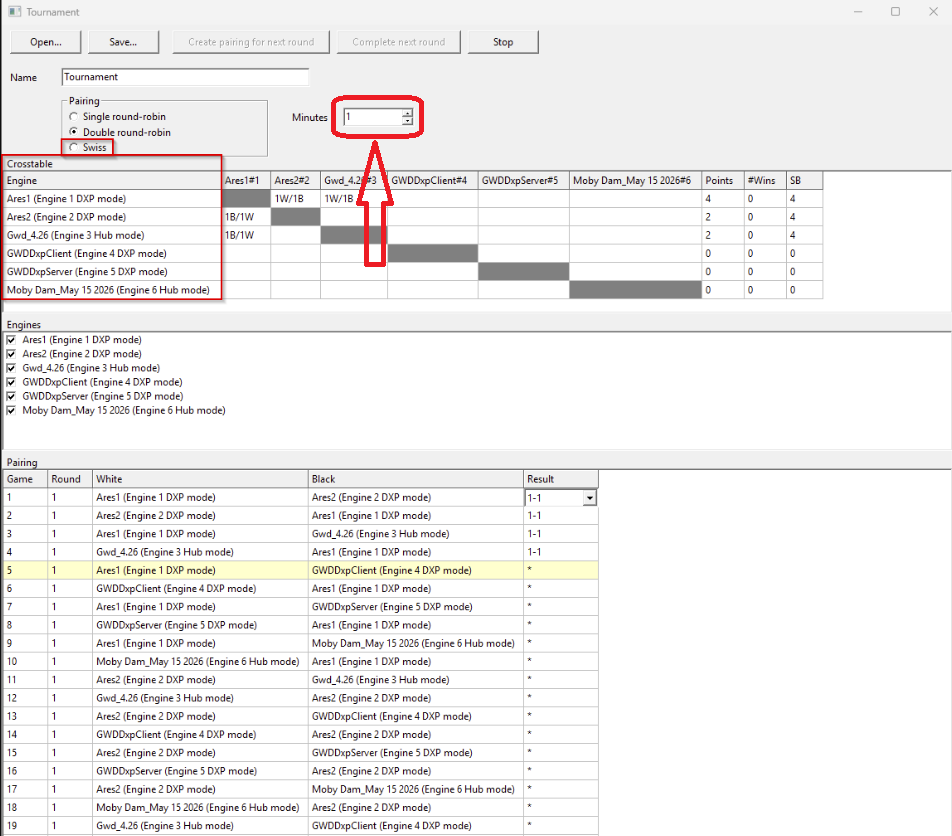
For the option I marked in red - I would give an option for the number of moves.
-
gwiesenekker
- Posts: 105
- Joined: Sun Feb 20, 2011 21:04
- Real name: Gijsbert Wiesenekker
Re: (Hub engine) GUI for International Draughts
Hi Krzysztof,
Thank you for your feedback and option has been added:
Regards,
GW
Thank you for your feedback and option has been added:
GW
-
Krzysztof Grzelak
- Posts: 1478
- Joined: Thu Jun 20, 2013 17:16
- Real name: Krzysztof Grzelak
Re: (Hub engine) GUI for International Draughts
You did it very nicely. I have another question because I'm interested in it. Is it possible to change the engine name? Let me give you an example of what I mean. I have an engine Ares Al 1.91 and I would like to change the name to Ares Al 1.91 x 64. Is it possible?
-
gwiesenekker
- Posts: 105
- Joined: Sun Feb 20, 2011 21:04
- Real name: Gijsbert Wiesenekker
Re: (Hub engine) GUI for International Draughts
Hi,
Joost suggested to have the option to play multiple games in parallel. The change Codex proposed would have worked but I was a little bit concerned about the massive refactor (and associated credits). As I wanted to do this exercise again anyway I now started a new project with the already mentioned guidelines: 'We should not pile everything into the main form but use small units/classes if possible', 'States (waiting for move, thinking) should be managed in finite state machines. States and state transitions should be logged', 'We will treat the human also as an engine' and (the change Codex proposed) 'For playing a game an orchestrator will load two engines into two slots and manage the game (time controls, sending the position, sending and receiving moves)'. I also realized the following would come in very handy: 'We will add a dummy engine that waits a random number of seconds between 0 and 5, and returns a random move from the list of legal moves.'
The iterations were:
1. Main form with 10x10 board
2. Board class (FEN starting position, generate legal moves, play through a list of moves)
3. Abstract base class for the engines, followed by answers like:
Added uEngineBase.pas with an abstract TDraughtsEngine base class.
It now provides:
NewGame(StartingFEN) to reset the engine’s game context
DoMove(Move) to append a played move to MovesPlayed
StartThinking: string as the public thinking call
protected abstract DoStartThinking: string for concrete engines to implement
FSM state tracking: waiting, ready, thinking, error
transition logging via StateLog
optional OnLog callback for future orchestrator/UI logging
public read-only CurrentState
4. Dummy engine
5. Orchestrator that will manage a game and two engines.The answer also mentions:
Verified with a temporary orchestrator smoke test using two dummy engines passed (Codex creates a temporary executable that tests the class).
6. Configure a game with white player, black player, time controls (time, number of moves, increment)
Each step took Codex a couple of minutes. At this point it was not clear to me how we should relay orchestrator state to the GUI, but Codex proposed:
The GUI should not poke at the live orchestrator internals directly while it is running. Instead, the orchestrator thread periodically publishes immutable snapshots (position, moves, clocks).
Codex implemented this by a TGameRunnerThread that owned the orchestrator AND the engines but that was not the idea. After pointing that out it refactored it into:
All that was left to do was adding a list-box where you could create (and delete) new games.
All this took about 30 minutes. 6 games running in parallel (using dummy engines):
Regards,
GW
Joost suggested to have the option to play multiple games in parallel. The change Codex proposed would have worked but I was a little bit concerned about the massive refactor (and associated credits). As I wanted to do this exercise again anyway I now started a new project with the already mentioned guidelines: 'We should not pile everything into the main form but use small units/classes if possible', 'States (waiting for move, thinking) should be managed in finite state machines. States and state transitions should be logged', 'We will treat the human also as an engine' and (the change Codex proposed) 'For playing a game an orchestrator will load two engines into two slots and manage the game (time controls, sending the position, sending and receiving moves)'. I also realized the following would come in very handy: 'We will add a dummy engine that waits a random number of seconds between 0 and 5, and returns a random move from the list of legal moves.'
The iterations were:
1. Main form with 10x10 board
2. Board class (FEN starting position, generate legal moves, play through a list of moves)
3. Abstract base class for the engines, followed by answers like:
Added uEngineBase.pas with an abstract TDraughtsEngine base class.
It now provides:
NewGame(StartingFEN) to reset the engine’s game context
DoMove(Move) to append a played move to MovesPlayed
StartThinking: string as the public thinking call
protected abstract DoStartThinking: string for concrete engines to implement
FSM state tracking: waiting, ready, thinking, error
transition logging via StateLog
optional OnLog callback for future orchestrator/UI logging
public read-only CurrentState
4. Dummy engine
5. Orchestrator that will manage a game and two engines.The answer also mentions:
Verified with a temporary orchestrator smoke test using two dummy engines passed (Codex creates a temporary executable that tests the class).
6. Configure a game with white player, black player, time controls (time, number of moves, increment)
Each step took Codex a couple of minutes. At this point it was not clear to me how we should relay orchestrator state to the GUI, but Codex proposed:
The GUI should not poke at the live orchestrator internals directly while it is running. Instead, the orchestrator thread periodically publishes immutable snapshots (position, moves, clocks).
Codex implemented this by a TGameRunnerThread that owned the orchestrator AND the engines but that was not the idea. After pointing that out it refactored it into:
Code: Select all
[GUI
  -> TGameRunnerThread
       -> TGameOrchestrator
            -> White engine
            -> Black engine
            -> Board/game state/clocks/moves/logs
All this took about 30 minutes. 6 games running in parallel (using dummy engines):
GW
-
gwiesenekker
- Posts: 105
- Joined: Sun Feb 20, 2011 21:04
- Real name: Gijsbert Wiesenekker
Re: (Hub engine) GUI for International Draughts
Hi Krzysztof,
For DXP engines you should be able to reconfigure the DXP ID in the 'Engines...' dialog-box: double click on the DXP ID and change the name. The ID of hub engines will be overwritten by the id= that the hub engine reports, I will make the overwrite configurable ('gui-do-not-change-hub-id') so you can manage the HUB ID yourself.
GW
For DXP engines you should be able to reconfigure the DXP ID in the 'Engines...' dialog-box: double click on the DXP ID and change the name. The ID of hub engines will be overwritten by the id= that the hub engine reports, I will make the overwrite configurable ('gui-do-not-change-hub-id') so you can manage the HUB ID yourself.
GW
-
gwiesenekker
- Posts: 105
- Joined: Sun Feb 20, 2011 21:04
- Real name: Gijsbert Wiesenekker
Re: (Hub engine) GUI for International Draughts
Hi,
It turns out I can leverage the (credits spent on the ) previous version by having the new version consult it read-only. The new engine registration dialog box works much better, as it captures stdout and the parameters, you can edit the parameters, (re)launch the engine if it errors out or seems to hang. Once it seems to have launched correctly the engine will be registered. It is also much easier to edit an existing engine just by double clicking on the registered entry as the engine will be re-launched again (useful for example if the author has updated the engine supporting new parameters):
The orchestrator will capture stdout from both engines but does not have to relay stdout to the GUI at all, the orchestrator only needs to pick up the PV and the move played.
GW
It turns out I can leverage the (credits spent on the
) previous version by having the new version consult it read-only. The new engine registration dialog box works much better, as it captures stdout and the parameters, you can edit the parameters, (re)launch the engine if it errors out or seems to hang. Once it seems to have launched correctly the engine will be registered. It is also much easier to edit an existing engine just by double clicking on the registered entry as the engine will be re-launched again (useful for example if the author has updated the engine supporting new parameters):GW
-
Krzysztof Grzelak
- Posts: 1478
- Joined: Thu Jun 20, 2013 17:16
- Real name: Krzysztof Grzelak
Re: (Hub engine) GUI for International Draughts
There are a few things I would improve.
board size - so that it can be reduced or enlarged
number the board fields
make a "New Game" and not a "Play Game"
board size - so that it can be reduced or enlarged
number the board fields
make a "New Game" and not a "Play Game"
-
Krzysztof Grzelak
- Posts: 1478
- Joined: Thu Jun 20, 2013 17:16
- Real name: Krzysztof Grzelak
Re: (Hub engine) GUI for International Draughts
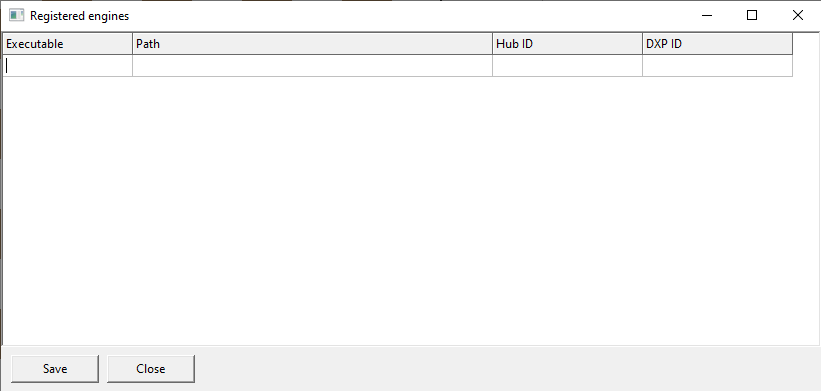
Another thing I would improve - this window is weak. You should be able to open the engine and save it.
-
gwiesenekker
- Posts: 105
- Joined: Sun Feb 20, 2011 21:04
- Real name: Gijsbert Wiesenekker
Re: (Hub engine) GUI for International Draughts
Hi Krzyszof,
Thank you for your feedback. In version 2 engine registration and update work as you propose: you can double-click on a registered engine to inspect/reconfigure it.
Regards,
GW
Thank you for your feedback. In version 2 engine registration and update work as you propose: you can double-click on a registered engine to inspect/reconfigure it.
Regards,
GW
-
Krzysztof Grzelak
- Posts: 1478
- Joined: Thu Jun 20, 2013 17:16
- Real name: Krzysztof Grzelak
Re: (Hub engine) GUI for International Draughts
So where is version 2?
-
gwiesenekker
- Posts: 105
- Joined: Sun Feb 20, 2011 21:04
- Real name: Gijsbert Wiesenekker
Re: (Hub engine) GUI for International Draughts
Hi Krzyszof,
Version 2 is not ready yet but coming along fine, I am now testing the new 'parallel games' option of the tournament:
Still to do: moves browser, PV, score-history, evaluation-bar and GUI cleanup.
GW
Version 2 is not ready yet but coming along fine, I am now testing the new 'parallel games' option of the tournament:
GW
-
Krzysztof Grzelak
- Posts: 1478
- Joined: Thu Jun 20, 2013 17:16
- Real name: Krzysztof Grzelak
Re: (Hub engine) GUI for International Draughts
I understand and thank you for the information.
-
gwiesenekker
- Posts: 105
- Joined: Sun Feb 20, 2011 21:04
- Real name: Gijsbert Wiesenekker
Re: (Hub engine) GUI for International Draughts
Hi,
I got errors when the next game of a DXP engine was started right after the previous game of that DXP engine was stopped and then Codex started to patch patches with patches again. The description of the patches looked reasonable ('I have identifed a race condition') so you apply them but we got nowhere.
Looking back the following would also have been a good instruction: 'When we are working on a bug you can add diagnostics to help find the root-cause, but you should not apply a patch until we have identified the root-cause'. While working on another bug it turned out the GUI was happily modifying runner/orchestrator objects:
TGameRunnerThread.RequestStop used to call FOrchestrator.StopEngines directly from the GUI thread. That meant the GUI thread could run full engine shutdown, mutate logs, fire callbacks, and touch orchestrator-owned objects while the runner thread was still inside PlayNextMove / StartThinking. Now RequestStop only interrupts engines via RequestStopEngines; the runner thread remains responsible for full StopEngines in its finally block.
Perhaps an instruction such as 'Thread communication should only take place through message queues' would have prevented that.
GW
I got errors when the next game of a DXP engine was started right after the previous game of that DXP engine was stopped and then Codex started to patch patches with patches again. The description of the patches looked reasonable ('I have identifed a race condition') so you apply them but we got nowhere.
Looking back the following would also have been a good instruction: 'When we are working on a bug you can add diagnostics to help find the root-cause, but you should not apply a patch until we have identified the root-cause'. While working on another bug it turned out the GUI was happily modifying runner/orchestrator objects:
TGameRunnerThread.RequestStop used to call FOrchestrator.StopEngines directly from the GUI thread. That meant the GUI thread could run full engine shutdown, mutate logs, fire callbacks, and touch orchestrator-owned objects while the runner thread was still inside PlayNextMove / StartThinking. Now RequestStop only interrupts engines via RequestStopEngines; the runner thread remains responsible for full StopEngines in its finally block.
Perhaps an instruction such as 'Thread communication should only take place through message queues' would have prevented that.
GW
-
gwiesenekker
- Posts: 105
- Joined: Sun Feb 20, 2011 21:04
- Real name: Gijsbert Wiesenekker
Re: (Hub engine) GUI for International Draughts
Hi,
Codex agrees:
Currently we use a simpler mixed model, not message queues.
The main pieces are:
- `TGameRunnerThread` owns the running game and calls the orchestrator/engines.
- The GUI starts/stops games and receives snapshots through `TThread.Synchronize`.
- Engine stdout callbacks call `RuntimeLog`, which publishes snapshots.
- Stop requests are now “soft interrupts”: GUI calls `Runner.RequestStop`, which sets `Terminate` and asks engines to break waits, but the runner thread performs real cleanup.
- Shared data is protected in a few places with critical sections: DXP socket, Hub line buffer, engine state log, runner log.
So communication is currently:
```text
GUI -> runner:
direct method calls / flags
Runner.RequestStop
Runner.Paused := ...
Runner.ShowStdout := ...
runner -> GUI:
Synchronize(@DeliverSnapshot)
engine/process callbacks -> runner:
direct OnLog callback
```
That works, but it is still more ad hoc than a proper actor/message-queue model.
Your message-queue approach would be cleaner for this project. The natural shape would be:
```text
GUI thread
sends commands:
StartGame
StopGame
PauseGame
ResumeGame
ShowStdout
Runner/orchestrator thread
owns:
orchestrator
engines
clocks
game state
engine state machines
receives commands from queue
emits events/snapshots:
SnapshotUpdated
LogLine
GameFinished
EngineStateChanged
```
Then we avoid direct cross-thread state mutation. The GUI never calls engine/orchestrator methods directly; it only posts commands. The runner never directly modifies GUI state; it posts snapshots/events back.
I think that is the better long-term architecture, especially now that we have Hub, DXP, tournament scheduling, pause/stop, clocks, and parallel games. Our current patching has made the direct-call model safer, but message queues would make the ownership boundaries much clearer.
GW
Codex agrees:
Currently we use a simpler mixed model, not message queues.
The main pieces are:
- `TGameRunnerThread` owns the running game and calls the orchestrator/engines.
- The GUI starts/stops games and receives snapshots through `TThread.Synchronize`.
- Engine stdout callbacks call `RuntimeLog`, which publishes snapshots.
- Stop requests are now “soft interrupts”: GUI calls `Runner.RequestStop`, which sets `Terminate` and asks engines to break waits, but the runner thread performs real cleanup.
- Shared data is protected in a few places with critical sections: DXP socket, Hub line buffer, engine state log, runner log.
So communication is currently:
```text
GUI -> runner:
direct method calls / flags
Runner.RequestStop
Runner.Paused := ...
Runner.ShowStdout := ...
runner -> GUI:
Synchronize(@DeliverSnapshot)
engine/process callbacks -> runner:
direct OnLog callback
```
That works, but it is still more ad hoc than a proper actor/message-queue model.
Your message-queue approach would be cleaner for this project. The natural shape would be:
```text
GUI thread
sends commands:
StartGame
StopGame
PauseGame
ResumeGame
ShowStdout
Runner/orchestrator thread
owns:
orchestrator
engines
clocks
game state
engine state machines
receives commands from queue
emits events/snapshots:
SnapshotUpdated
LogLine
GameFinished
EngineStateChanged
```
Then we avoid direct cross-thread state mutation. The GUI never calls engine/orchestrator methods directly; it only posts commands. The runner never directly modifies GUI state; it posts snapshots/events back.
I think that is the better long-term architecture, especially now that we have Hub, DXP, tournament scheduling, pause/stop, clocks, and parallel games. Our current patching has made the direct-call model safer, but message queues would make the ownership boundaries much clearer.
GW
